

|
Home · All Classes · Grouped Classes · Annotated · Functions | |
The QSpeedDial class provides access to the Speed Dial settings. More...
#include <QSpeedDial>
The QSpeedDial class provides access to the Speed Dial settings.
The QSpeedDial class includes a set of static functions that give access to the Speed Dial settings. This class should not be instantiated.
The input range is from 1 to 99. To allow the user to select an input for a given action, use addWithDialog().
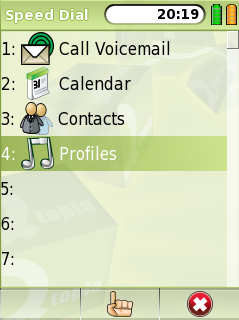
To directly modify the Speed Dial settings, use remove() and set(). Use find() to retrieve the assigned action for a given input.
See also QSpeedDialList.
Provides a dialog that allows the user to select an input for action action, using label and icon as the display label and icon respectively. parent will be used as the dialog's parent.
Returns the input that the user selected; it is up to you to use set() to assign the selection.
If the user cancels the dialog, a null string is returned.
See also set().
Returns a list of the currently assigned Speed Dial inputs.
This function was introduced in Qtopia 4.3.
See also possibleInputs().
Returns a QtopiaServiceDescription for the given Speed Dial input.
Returns a list of possible Speed Dial inputs, some of which may be assigned already.
This function was introduced in Qtopia 4.3.
See also assignedInputs().
Removes the action currently associated with the given Speed Dial input.
Assigns the given QtopiaServiceDescription, r, as the action to perform when the given Speed Dial input, is detected.
| Copyright © 2007 Trolltech | Trademarks | Qtopia 4.3.0 |