|
Home · All Classes · Grouped Classes · Annotated · Functions | |
The QFormLayout class manages forms of input widgets with associated labels. More...
#include <QFormLayout>
This class is under development and is subject to change.
Inherits QLayout.
This class was introduced in Qtopia 4.3.
The QFormLayout class manages forms of input widgets with associated labels.
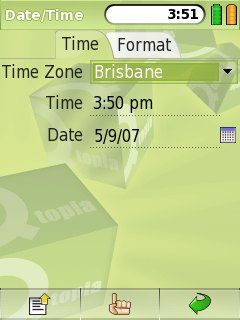
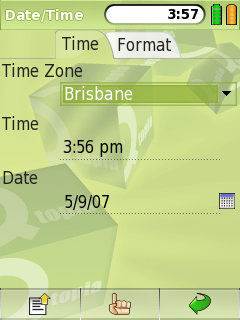
QFormLayout lays out widgets in a form. The way a form is laid out is based on the style hint QPhoneStyle::SH_FormStyle, which can have the values QtopiaDefaultStyle or QtopiaTwoLineStyle. QtopiaDefaultStyle places labels side by side with their buddy fields, while QtopiaTwoLineStyle places labels above their buddy fields. The following table shows the same interface in each style.
| QtopiaDefaultStyle | QtopiaTwoLineStyle |
|---|---|
|
|
In QtopiaDefaultStyle mode, labels will be given enough horizontal space to fit the widest label, and the rest of the space will be given to the fields. If the minimum size of a label/field pair is wider than the available space, the field will be wrapped to the next line.
See also QBoxLayout, QGridLayout, and QStackedLayout.
This enum specifies the different looks supported by QFormLayout.
| Constant | Value | Description |
|---|---|---|
| QFormLayout::QtopiaDefaultStyle | 0 | Labels are placed side by side with their buddy fields. |
| QFormLayout::QtopiaTwoLineStyle | 1 | Labels are placed above their buddy fields |
Access functions:
Access functions:
Constructs a new QFormLayout with parent widget parent.
Constructs a new QFormLayout.
Destroys the form layout.
Adds layout to the end of this form layout with label label. In SideBySide mode, if label is null the layout will take all available horizontal space.
See also insertWidget().
This is an overloaded member function, provided for convenience.
Adds layout to the end of this form layout with label label. In SideBySide mode, if label is null the layout will take all available horizontal space.
See also insertWidget().
This is an overloaded member function, provided for convenience.
Adds layout to the end of this form layout with no label. Same as calling addLayout(0, layout).
See also addLayout().
Adds field to the end of this form layout with label label. In SideBySide mode, if label is null the widget will take all available horizontal space.
See also insertWidget().
This is an overloaded member function, provided for convenience.
Adds field to the end of this form layout with label label. In SideBySide mode, if label is null the widget will take all available horizontal space.
See also insertWidget().
This is an overloaded member function, provided for convenience.
Adds field to the end of this form layout with no label. Same as calling addWidget(0, field).
See also addWidget().
Inserts layout at position index with label label. If index is negative, the layout is added at the end. In SideBySide mode, if label is null the layout will take all available horizontal space.
See also addLayout().
This is an overloaded member function, provided for convenience.
Inserts layout at position index with label label. If index is negative, the layout is added at the end. In SideBySide mode, if label is null the layout will take all available horizontal space.
See also addLayout().
This is an overloaded member function, provided for convenience.
Inserts layout at position index with no label. If index is negative, the layout is added at the end.
See also insertLayout().
Inserts field at position index with label label. If index is negative, the widget is added at the end. In SideBySide mode, if label is null the widget will take all available horizontal space.
See also addWidget().
This is an overloaded member function, provided for convenience.
Inserts field at position index with label label. If index is negative, the widget is added at the end. In SideBySide mode, if label is null the widget will take all available horizontal space.
See also addWidget().
This is an overloaded member function, provided for convenience.
Inserts field at position index with no label. If index is negative, the widget is added at the end.
See also insertWidget().
| Copyright © 2007 Trolltech | Trademarks | Qtopia 4.3.0 |